
SAP BUSINESS ONE AI
Securely Connecting ChatGPT or Claude to SAP Business One
That distinction is the whole security design. The model never holds credentials and never touches the database.
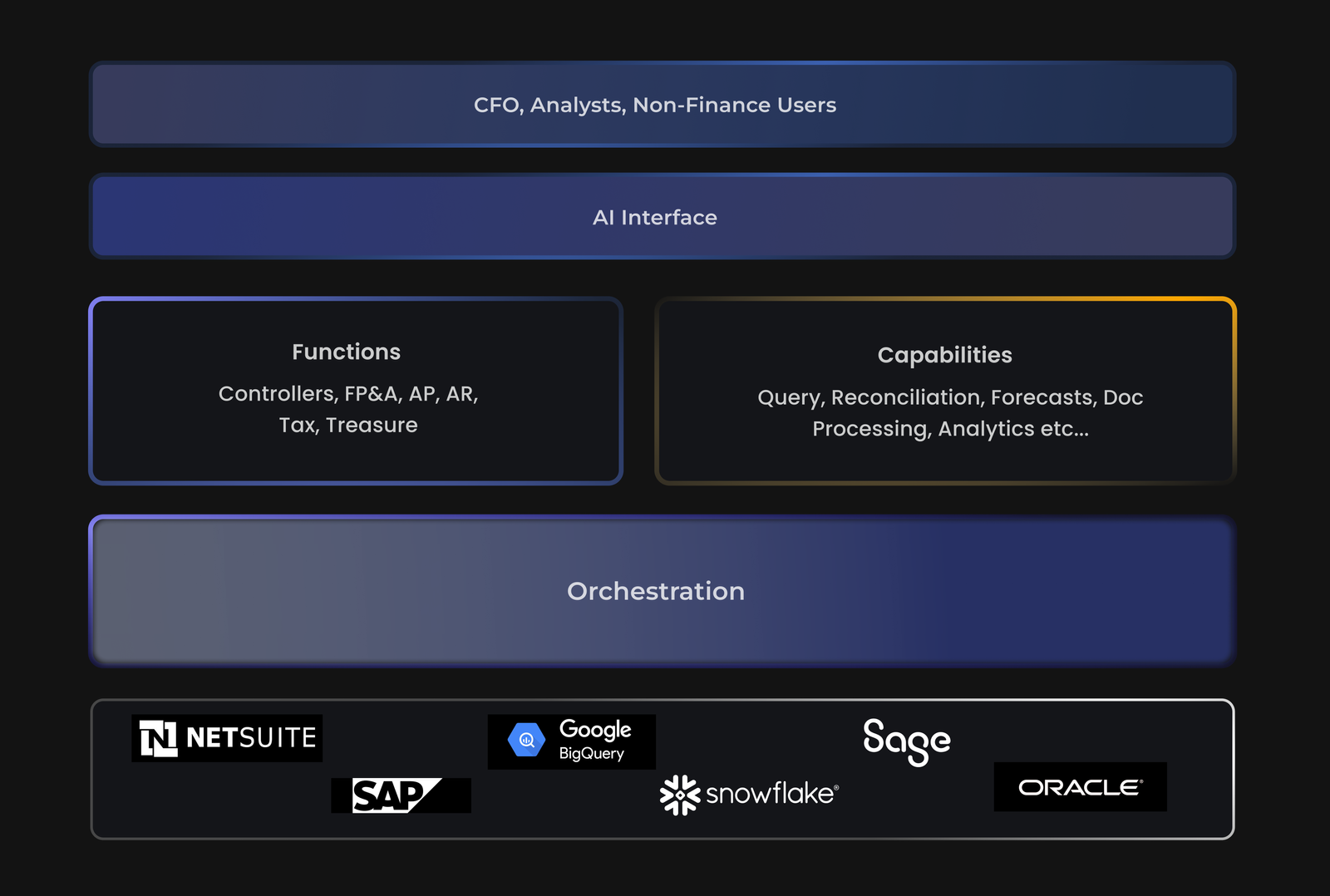
- The model is not connected to SAP Business One directly. A tool layer sits between them, and the model calls tools.
- Any capable model works, ChatGPT, Claude, Azure OpenAI or another, because the tool layer is what does the connecting.
- SAP Business AI, including Joule, is aimed at the enterprise suite rather than SAP Business One, so it is not the route here.
- The connection uses the Service Layer, so the agent authenticates as a user and inherits your authorisations.
- ChatFin provides the tool layer, works with any capable model, and connects through the Service Layer with no database credentials.
This question is usually asked as if the model plugs into the ERP. It does not, and understanding why reframes the whole security conversation in a reassuring direction.
The model receives a question and a list of tools it may call. A middle layer executes those tools against SAP Business One and returns the results. The model never sees a credential.
The Model Never Holds Credentials
Worth establishing first, because it removes most of the perceived risk. The language model has no credentials, no connection string and no network route to SAP Business One.
It receives a question and a list of tools it may call. Your middle layer executes those tools, applies policy and returns structured results. Everything the model can do is an entry in that list.
Any Capable Model Works
Because the tool layer does the connecting, the choice of model is not a lock in. ChatGPT, Claude, Azure OpenAI or another capable model can each drive the same tools.
That means you can choose a model on its merits, or your data handling requirements, without rebuilding the integration, and switch later if you need to.
Where SAP Business AI and Joule Fit
A common assumption is that SAP's own AI is the natural route for SAP Business One. It is worth being clear that SAP Business AI, including the Joule assistant, is aimed at the enterprise suite.
Joule is embedded across S/4HANA, SuccessFactors, Ariba and the Business Technology Platform. It is not a SAP Business One product, so for a Business One company it is not the route, which is precisely the gap a Business One specific agent fills.
Authenticating Through the Service Layer
The connection itself uses the Service Layer, SAP Business One's modern REST interface. A session login with the company database returns a session the agent uses for subsequent calls.
Because the session belongs to a user, the agent inherits that user's authorisations, so everything it can see is what that user could see. No database account is required anywhere.
Limiting What Moves and What It Can Do
Two disciplines make the connection safe beyond authentication. Move as little data as possible, and constrain what the agent can do to a short list.
Aggregate at the source so summaries travel rather than bulk rows, and whitelist the specific operations the agent may perform so anything not on the list is impossible.
"You do not connect the model to your ERP. You connect a tool layer, and the model asks it questions. That is the whole security story."

Why Building This Yourself Is the Project
Connecting a model to SAP Business One in a basic way is achievable quickly. Making it safe, accurate and able to transact is the project.
The tool layer has to understand SAP Business One's conventions, handle exceptions, enforce approval, keep an audit record and use your user defined fields correctly. That is what a finance agent product provides ready made.
Where ChatFin Fits
ChatFin is the tool layer. It connects to SAP Business One through the Service Layer so the agent inherits your authorisations, holds no database credentials, and works with whichever capable model you choose.
It aggregates at source, whitelists its actions, and requires approval on anything that posts. Our page on connecting to the Service Layer covers the mechanics in detail.

Connect a Tool Layer, Not the Model
ChatFin connects to SAP Business One through the Service Layer, works with any capable model, holds no database credentials, and requires approval on anything that posts.
The model never holds a credential. It asks a tool layer, and the tool layer talks to SAP Business One.
Where SAP Business One reporting runs out
SAP Business One handles transactions well. These five gaps are documented, and every one of them ends in a spreadsheet.
No native consolidation. Multi company consolidation means exporting each company's reports and combining them in Excel, which is why close week reruns the same pack repeatedly.
No transaction currency reporting. Native reports cannot produce statements in transaction currencies, which makes reconciliation harder and slows period end.
One accounting standard per company. B1 assumes a single reporting standard per managed company, so running US GAAP and IFRS in parallel means manual adjustment at consolidation.
Rigid report formats. A chart of accounts change forces manual restructuring of income statement rows rather than the report adapting.
Weak statutory mapping. You can hold an external code per GL account, but there is no mapping to multiple alternate charts and no way to run statements on them.
An agent connected over the Service Layer reads across companies and answers the consolidated question directly, which is the step that currently happens in Excel.
What Each Party Holds in the Connection
Three parties are involved and each holds something different. The model provider receives the conversation and the results the tools return. The tool layer holds the Service Layer session and the policy about what may be asked. SAP Business One holds the data and the authorisations of the user the session belongs to. No party holds another's secrets, and that separation is the security design.
Four things settle the risk before anything is connected: which SAP user the layer logs in as, what that user can see, which fields leave SAP Business One in a result, and where the model provider processes those results. Answer those on paper first. The code comes afterwards and is the shorter job.
Caitlin Haberberger, CFO of Verdant, on integration and ETL tools.
“Another thing that we've definitely invested into these integration or ETL tools. I think some of that starts going away as we have systems that can talk to each other better, or we have an AI layer that's translating between tools.”
Connection Situations Worth Planning For
Five moments a finance team meets once a model touches SAP Business One, and how the tool layer handles each.
- Reports pasted into a personal account. A controller copies an aged receivables report into a personal chatbot to save an hour. The governed route gives that person the same answer through the tool layer, with the question and the result logged.
- A first week of read-only questions. The agent user gets read authorisations only and answers questions about balances and open documents. Writes stay off until the team trusts the answers.
- A request the list does not cover. Someone asks for every supplier's bank details in one file. No tool on the list does that, so the model cannot do it, and the attempt shows in the log.
- A change of model. The security team prefers a different provider after a data handling review. The tools stay the same, so the switch is a configuration change on the model side.
- Trying it on a test company. The admin points the layer at a test company database first, with its own credentials, so mistakes cost nothing in the live books.
Chris Ortega, a fractional CFO and CEO of Fresh FP&A, on personal AI tools used for business work.
“You have people that are using these personal tools that are doing work for your business. You have exposure. It's just really assessing how do we put the guardrails in the sandbox for people to operate in these and leverage these tools. But how do you do it in a way that is protecting the business first?”
Quick Answers on Connecting AI to B1
Can ChatGPT connect directly to SAP Business One?
Not safely as a direct link. The model calls tools, and a tool layer talks to SAP Business One through the Service Layer. The model never holds a credential or a connection string.
Does Claude need database access to read SAP Business One?
No. Claude calls tools, and the tool layer reads through the Service Layer as a SAP user. No database account is involved, and it works the same on SQL Server and SAP HANA.
Which SAP user should an AI agent connect as in SAP B1?
A dedicated user whose authorisations match what the agent should see and do. Because the session belongs to that user, the agent can never see more than that user could.
Is it safe to paste SAP B1 reports into ChatGPT?
That depends on your data handling rules and the provider's terms. A tool layer is the controlled alternative, because it returns only the fields requested and logs every call.
Can I switch between ChatGPT and Claude later on SAP B1?
Yes. The finance logic lives in the tool layer, so changing the model does not mean rebuilding the connection to SAP Business One.
Frequently Asked Questions
How do I connect ChatGPT or Claude to SAP Business One?
You connect a tool layer to SAP Business One, and the model calls the tools. The model itself never holds a credential or touches your data; it receives a question and a list of tools it may call, and a middle layer executes those against SAP Business One through the Service Layer. Any capable model works, so you can choose ChatGPT, Claude, Azure OpenAI or another on its merits.
Can we use SAP Business AI or Joule for SAP Business One?
Not really, because SAP Business AI, including Joule, is aimed at the enterprise suite. Joule is embedded across S/4HANA, SuccessFactors, Ariba and the Business Technology Platform, and it is not a SAP Business One product. For a Business One company the route is a Business One specific agent, which can run on whichever capable model you choose.
Does the model see our SAP Business One data directly?
No. The model receives only what the tool layer returns for a specific question, and it has no credentials or network route to SAP Business One. The connection runs through the Service Layer with a session that inherits a user's authorisations, data is aggregated at source so summaries travel rather than bulk rows, and the agent's actions are limited to a whitelist.