
AI Automation Agents: Run Reconciliations with a Single Command
Month-end reconciliations take days of manual work, pulling data from multiple systems, matching transactions, investigating variances, and documenting everything. ChatFin Automation Agents execute entire reconciliation workflows automatically with simple natural language commands.
Published: 2026-02-06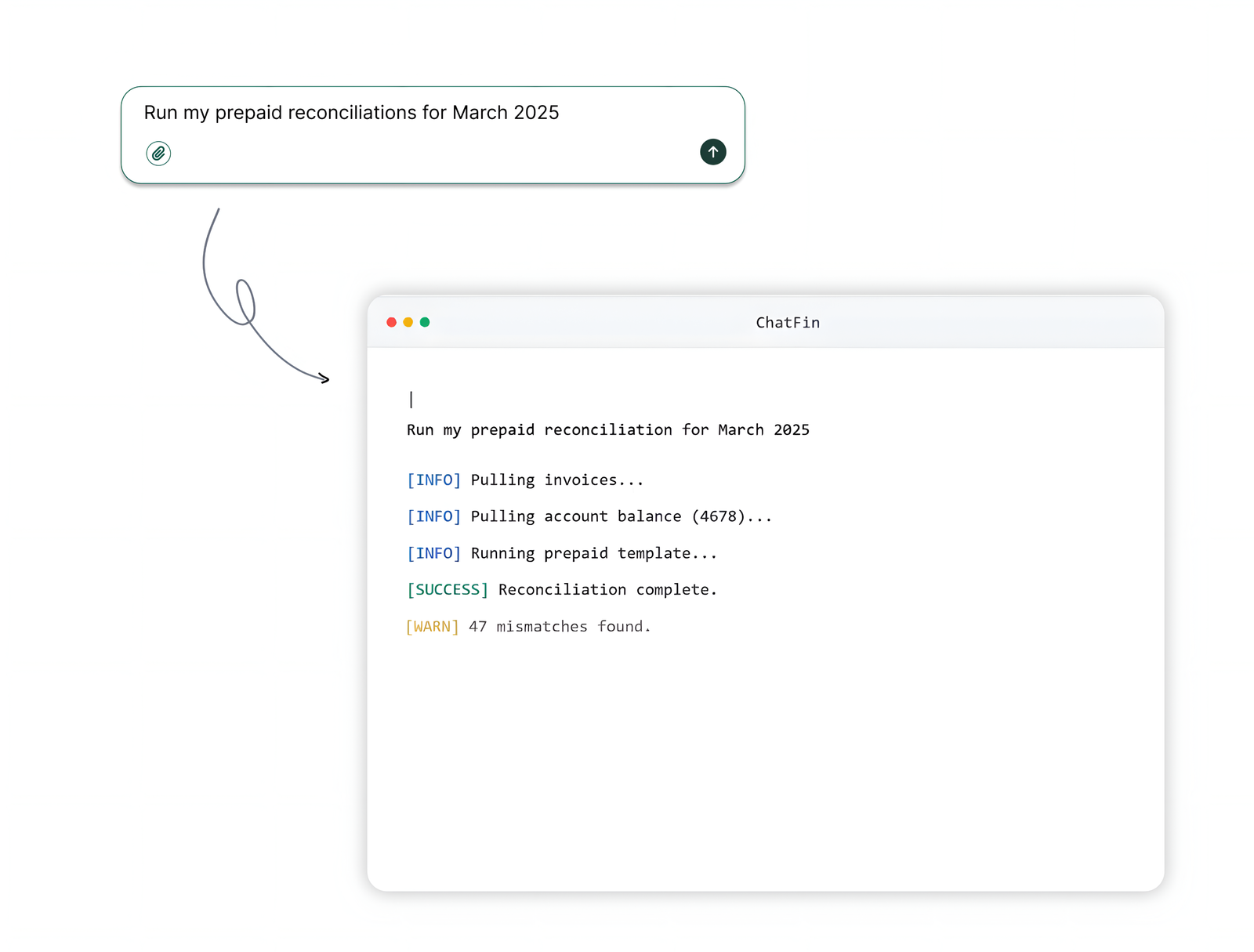
Finance teams spend weeks every month on reconciliations. Controllers manually pull invoices from AP systems, export GL balances, build complex Excel models, perform matching logic, and investigate every variance. The scale of this problem is detailed in our step-by-step guide to building AI agents for account reconciliation. Learn more about building AI agents for reconciliations. Learn more about AI tools for finance controllers.
Prepaid expense reconciliations alone consume 8-12 hours per month. Accrued liabilities take another 10-15 hours. Balance sheet account reconciliations add 20-30 hours. Most of this work is repetitive data gathering and manipulation, not actual analysis.
ChatFin Automation Agents eliminate the manual work. Type a command like "Run my prepaid reconciliations for March 2025", the agent automatically pulls invoices, retrieves account balances, applies reconciliation templates, performs matching, and flags exceptions. Complete automation in seconds.
Example: "Run my prepaid reconciliations for March 2025" , Automation Agent pulls 4,678 invoices from AP system, retrieves GL balance for prepaid accounts, applies prepaid expense template with amortization logic, performs line-by-line matching, identifies 47 mismatches requiring review, and completes reconciliation in 23 seconds. Manual process would take 8-10 hours. Learn more about accounts payable automation with AI.
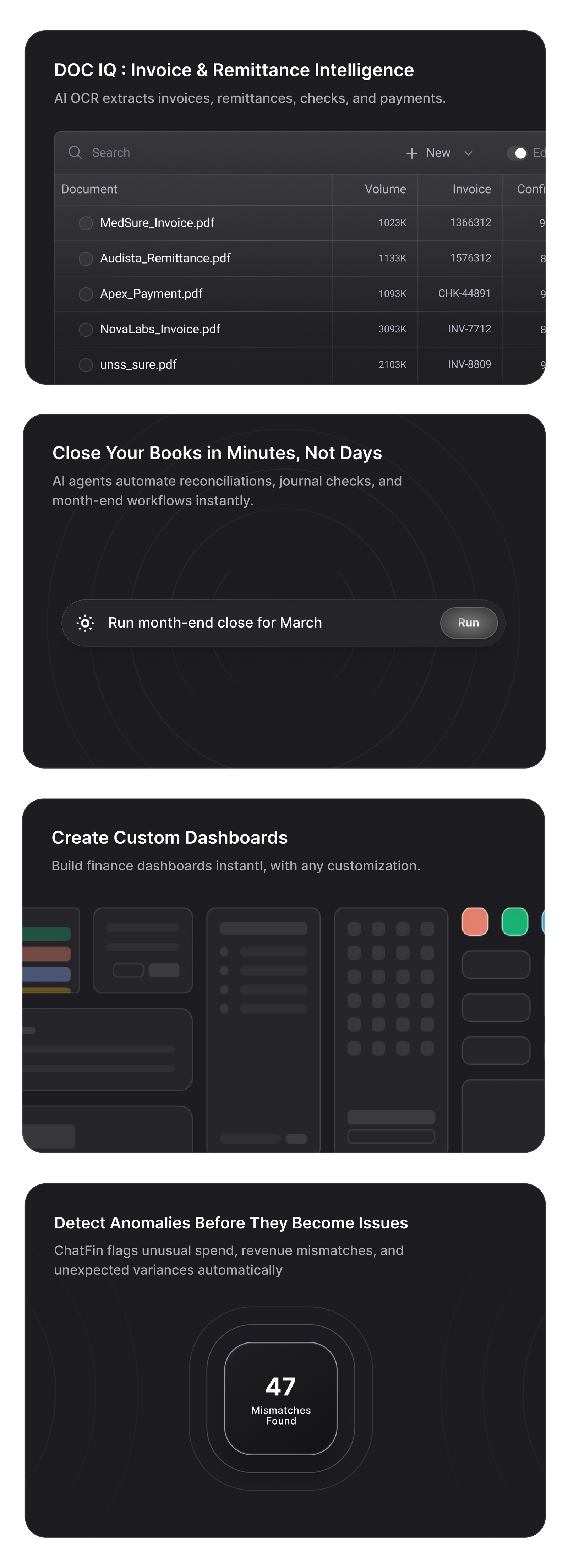
How ChatFin Makes Reconciliation Effortless: No complex setup. No coding required. No technical expertise needed. Just type what you want to reconcile in plain English, and ChatFin handles everything,data gathering, matching, variance analysis, and documentation. What used to take 8 hours of manual Excel work now takes a single 10-second command.
The Manual Reconciliation Problem
Data Gathering Takes Hours: Log into AP system. Export invoice details to Excel. Log into GL system. Export account balances to Excel. Download supporting documentation from shared drives. Organize files in reconciliation folder structure.
Manual Matching is Tedious: Build VLOOKUP formulas to match invoices to GL entries. Manually review mismatches one by one. Investigate date differences, amount variances, and missing transactions. Update spreadsheets with explanations.
Template Complexity: Prepaid reconciliations require amortization calculations. Accruals need expense allocation logic. Each account type has different matching rules and thresholds. Building and maintaining Excel templates is time-consuming.
Version Control Chaos: Multiple people working on reconciliations. "Final_v3_revised_FINAL.xlsx" naming conventions. Emailing spreadsheets back and forth. No clear source of truth on reconciliation status.
Audit Trail Gaps: Documentation scattered across emails, shared drives, and local computers. Hard to prove what was reconciled, when, and by whom. Auditors request evidence that takes hours to compile.
How ChatFin Automation Agents Work
ChatFin Automation Agents understand natural language commands and execute complete workflows autonomously. You issue a command. The agent orchestrates every step,data retrieval, template application, matching logic, exception identification, and documentation. Learn more about this approach in our complete guide to AI agents in finance.
Give instructions in plain English: "Run my prepaid reconciliations for March 2025" or "Reconcile all balance sheet accounts for Q4." Agent understands intent and executes automatically.
Agent pulls invoices from AP system, retrieves GL balances, accesses supporting documentation, and gathers any other required data sources,all without manual intervention.
Applies correct reconciliation template based on account type. Prepaid templates include amortization. Accrual templates apply expense allocation. Custom logic for each workflow.
Performs line-by-line matching using AI-powered algorithms. Matches by invoice number, amount, date, vendor, and custom criteria. Handles fuzzy matching for near-duplicates.
Automatically identifies mismatches, variances, and exceptions. Categorizes issues by type,date differences, amount variances, missing entries. Quantifies total discrepancies requiring review.
Creates complete reconciliation documentation automatically. Timestamps every action. Maintains evidence trail. Generates audit-ready reports showing what reconciled and what requires attention.
Real World Impact: From 8 Hours to 23 Seconds
Before ChatFin: Senior accountant logs into AP system at 9:00am Monday morning. Exports 4,678 invoices to Excel. Logs into GL system, exports prepaid account balance. Spends 2 hours organizing data. Builds VLOOKUP formulas for matching. Manually reviews 200+ mismatches. Investigates date differences and amount variances. Updates reconciliation spreadsheet with explanations. Finishes at 5:30pm. 8.5 hours of work.
After ChatFin: Senior accountant opens ChatFin at 9:00am Monday morning. Types "Run my prepaid reconciliations for March 2025." Automation Agent executes in 23 seconds,pulls all invoices, retrieves GL balance, applies prepaid template, performs matching, identifies 47 mismatches. Accountant reviews only the 47 exceptions, spending 45 minutes on actual analysis instead of 8 hours on data work.
Impact: Reconciliation time reduced from 8.5 hours to 23 seconds of automation plus 45 minutes of exception review. 90% time savings. Staff focus shifted from data manipulation to actual accounting analysis. Month-end close accelerated by 6 days across all reconciliations. Learn more about automating month-end close processes.
Key Benefits of Automation Agents
One-Command Execution: No multi-step processes. No opening multiple systems. Just issue a command and the entire workflow executes automatically. Complexity hidden behind simple interface.
Complete Workflow Automation: Not just data extraction or matching. Entire end-to-end process automated,from data gathering through exception identification to audit documentation. True workflow automation.
Template Intelligence: AI applies correct reconciliation logic based on account type. Prepaid amortization, accrual allocation, intercompany netting,all handled automatically with proper accounting treatment.
Exception Focus: Automation handles everything that reconciles cleanly. You only review exceptions and variances requiring judgment. 90% of work eliminated, focus on 10% that matters.
Speed and Scale: Process any volume in seconds. 100 invoices or 100,000 invoices,execution time is the same. Manual work scales linearly with volume. Automation scales infinitely.
Audit Trail Automatic: Complete documentation created automatically. Every data source timestamped. Every matching decision logged. Every exception categorized. Audit-ready evidence without manual compilation.
Common Automation Use Cases
Prepaid Expense Reconciliation: "Run my prepaid reconciliations for March 2025", Agent pulls invoices, applies amortization schedules, matches to GL, identifies items requiring adjustment. Handles insurance, software licenses, rent, and any prepaid category.
Accrued Liability Reconciliation: "Reconcile accrued liabilities for Q4", Agent analyzes expense patterns, calculates accrual amounts, validates against vendor invoices, flags variances. Automates complex expense allocation logic.
Balance Sheet Account Reconciliation: "Run all balance sheet reconciliations for month-end", Agent processes multiple account types simultaneously. Each account gets appropriate template. Complete balance sheet reconciled in minutes.
Intercompany Reconciliation: "Reconcile intercompany accounts across all entities", Agent matches transactions between entities, identifies timing differences, calculates netting entries, proposes eliminating entries. Complex multi-entity reconciliation automated.
Bank Reconciliation: "Run bank reconciliations for all accounts", Agent pulls bank statements, matches to cash book entries, identifies outstanding checks, calculates deposits in transit, reconciles bank balance to GL.
AR/AP Reconciliation: "Reconcile AR subsidiary ledger to GL", Agent analyzes customer balances, identifies discrepancies between subledger and GL, flags items requiring correction. Same logic for AP reconciliations.
Implementation Process
Week 1: Template Configuration
Define reconciliation templates for each account type. Configure data sources, matching rules, exception
thresholds, and approval workflows. ChatFin provides pre-built templates for common reconciliations.
Week 2: System Integration
Connect ChatFin to your ERP, AP system, GL, and other data sources. Verify data access and field
mapping. Test data retrieval across different account types and periods.
Week 3-4: Parallel Testing
Run automated reconciliations in parallel with manual process. Compare results. Validate accuracy.
Refine matching logic and exception rules. Build team confidence in automation.
Week 5-6: Production Deployment
Transition to fully automated reconciliations. Staff focus shifts to exception review and variance
investigation. Manual data work eliminated. Month-end close time reduced significantly.
Month 3+: Continuous Optimization
AI learns from exception patterns. Matching logic improves. False positives decrease. Exception
categorization gets smarter. Process efficiency compounds over time.
Cleared items still need a look
Reconciliation agents clear the obvious matches in seconds. Over months, a small share of wrong matches can build into a balance nobody can explain.
The AgentCFO podcast flagged unreviewed automated postings as a risk that stays hidden until a balance stops making sense weeks later.
Sample auto-cleared matches every week alongside the exceptions, so errors in the matching rules are caught while they are still small.
Why ChatFin Automation Agents
True Workflow Automation: Not point solution for one step. Complete end-to-end workflow automation from command to completion. Everything automated, not just pieces.
Natural Language Commands: No complex UI navigation. No clicking through multiple screens. Just tell the agent what to do in plain English. Simplest possible interface for most complex workflows.
Accounting Intelligence Built-In: AI understands prepaid amortization, accrual accounting, matching concepts, and reconciliation logic. Not generic automation adapted for finance,built specifically for accounting workflows.
Enterprise System Integration: Native connectors to SAP, NetSuite, Oracle, Dynamics 365, and other ERP systems. Access data where it lives without ETL complexity or manual exports. See how multi-ERP finance automation eliminates integration overhead.
Audit and Compliance Ready: Every execution logged with complete audit trail. Data lineage tracked. Changes documented. Evidence automatically compiled. Meets SOX and audit requirements without additional work.
Platform Integration: With the advent of AI, finance teams no longer need to buy multiple specialized tools for every workflow. AI can reason across processes, adapt to context, and configure itself to support a wide range of needs.
That is exactly what ChatFin does. ChatFin provides pre-built AI agents designed for specific finance use cases,while still working together as a single, unified platform. Each agent handles a focused workflow, but the system as a whole supports many use cases without requiring separate point solutions.
This is why many CFOs now prefer a platform like ChatFin instead of managing 10 different tools,reducing complexity, cost, and manual coordination while gaining broader automation and insight.
Get Started with Automation Agents
Stop spending days on manual reconciliations every month. Stop building complex Excel templates that break. Stop manually gathering data from multiple systems.
ChatFin Automation Agents execute complete reconciliation workflows with simple commands. Run prepaid reconciliations, accrued liabilities, balance sheet accounts, intercompany balances,all automated in seconds with complete audit documentation.
Talk to Our Experts: We know choosing the right tools is confusing. Our experts have worked across many platforms and can help you see what actually works,and what's next with AI. Talk to us, and we'll walk you through it.
March 2026 Update: In March 2026, AI-powered bank reconciliation has moved beyond simple transaction matching. Leading platforms now use multi-modal AI agents that handle currency normalization, cross-entity matching, and automated exception resolution. Organizations implementing AI reconciliation agents report matching accuracy rates above 98% and average time savings exceeding 75% on monthly bank reconciliation cycles.
When Does an AI Reconciliation Tool Beat Rule-Based Matching?
A rules-based reconciliation matches a bank line to a ledger entry when the amount and date agree exactly. Real statements rarely behave. One deposit settles several invoices, the bank truncates the payer name, card processors net out fees, and a check clears weeks after it was written. An AI reconciliation tool reads the description, the amounts and the history of that account, and proposes groupings that a fixed rule would miss.
The arithmetic still has to be exact. The AI proposes a match, and a deterministic check confirms that the grouped lines add up and that the reconciled balance equals the bank balance. Anything with a leftover difference stays open. When you compare an AI reconciliation tool, ask how it proves a match and what the accountant sees for the lines it was unsure about.
Paul Barnhurst, known as The FP&A Guy, on language models and numbers.
“It's a large language model. It's not a large math model. If you're going to deal with numbers, you need a deterministic solution.”
Bank Reconciliation Situations an AI Agent Handles
Bank accounts produce a few awkward patterns every month. These are the ones an agent can sort, and what the accountant gets instead.
- One deposit, many invoices. A customer pays several invoices in one transfer. The agent finds the combination that adds up to the deposit and proposes it, instead of the accountant testing totals by hand.
- Card processor payouts. A settlement lands net of fees and refunds. The agent splits it into gross sales, fees and refunds against the right ledger lines, so the payout reconciles line by line.
- Checks outstanding at period end. The agent lists issued checks that have not cleared and carries them forward with their age. Old ones are flagged for follow-up instead of sitting unseen.
- A foreign currency account. The bank amount is in the account's currency and the ledger is in the reporting currency. The agent separates timing differences from exchange differences, so only real gaps get reviewed.
- A statement file that looks wrong. A bank changes its file layout or sends a repeated line. The agent flags the file as odd before loading it, and the accountant who knows the account decides what to do.
- Card feed lines and expense reports. Matching card transactions to submitted expenses follows the same pattern. The agent proposes pairings and leaves unmatched receipts with the employee who owns them.
Samantha Singer-Guindi, a CFO, controller and director of finance in hospitality, on feeding a bank statement to a tool.
“It's easy to feed in a bank statement, but if there's a hiccup, are they gonna have the know-how to answer those tough questions or do that problem solving?”
Caitlin Haberberger, CFO of Verdant, on matching work in finance.
“Easy, low hanging fruit is just lots of things where you're matching things together to reconcile. Whether it's expense reporting or things like that, reconciling data between different systems. Gosh, I'd love to not be spending that kind of time.”
Quick Answers on AI Reconciliation Tools
What does an AI reconciliation tool do?
It pulls two sources, such as a bank statement and the ledger, proposes which lines belong together, flags what has no match and keeps a record of each decision. The accountant reviews exceptions and signs off the result.
How accurate is an AI reconciliation tool?
It depends on the account. Accounts with clear references match nearly everything, while accounts with netted settlements or vague descriptions leave more for review. Test on a closed month where you know the answers, and look at wrong matches, not only the match rate.
How is an AI reconciliation tool different from Excel and VLOOKUP?
A lookup finds exact matches in columns you prepare. An AI tool also handles one-to-many matches, messy descriptions and timing differences, and it keeps the audit trail without version copies of a workbook.
What should an accountant review after an AI bank reconciliation?
The unmatched items, a sample of the auto-matched ones, any account with an unexplained difference, and the final sign-off. Sampling the cleared items catches a bad matching rule while its effect is still small.
Can an AI reconciliation tool connect to my bank and ERP?
Usually through bank feeds or statement files on one side and the ERP's documented interfaces on the other. Ask which banks, file formats and ERP versions are supported, and whether the tool only reads the ledger or posts adjustments.
Does an AI reconciliation tool help with audits?
It can, if it records each match, who approved it and what evidence supported it. Auditors then ask for a report instead of asking staff to rebuild the month from emails and spreadsheets.
Your AI Journey Starts Here
Transform your finance operations with intelligent AI agents. Book a personalized demo and discover how ChatFin can automate your workflows.
Book Your Demo
Fill out the form and we'll be in touch within 24 hours